OpenClaw: The beginning of Personal Assistant AI Era?
You know that feeling when you're drowning in messages across WhatsApp, Telegram, Discord, and your work Slack? And half the time you need to ask the same questions or run the same commands over and over? Or you are tired of manually orchestrating the decision flow when using your AI?
What if you had an AI agent that lived in your pocket, saw every message you got, and could actually do stuff—run commands, access your files, send responses—all without you having to manually copy-paste or think about it or even asking it to do so? And what if the AI modifies itself and tailors itself to your needs without you taking effort?
That's OpenClaw.
But here's the thing: an agent that powerful is also an agent that's dangerous if you're not careful.
What OpenClaw Actually Does
OpenClaw is a bridge between chat apps (WhatsApp, Telegram, Discord, iMessage) and an AI agent running locally or on your server. You send a message, the agent sees it, decides what to do, and sends a response back. It can:
- Answer questions (via Claude, GPT, or other models)
- Run shell commands on your machine
- Read and write files
- Access your calendar, email, or other integrations
- Spawn sub-agents to do complex work in the background
- Remember context across conversations
- MOST IMPORTANTLY: It can take actions and initiatives by itself to manage and perform actions across your system
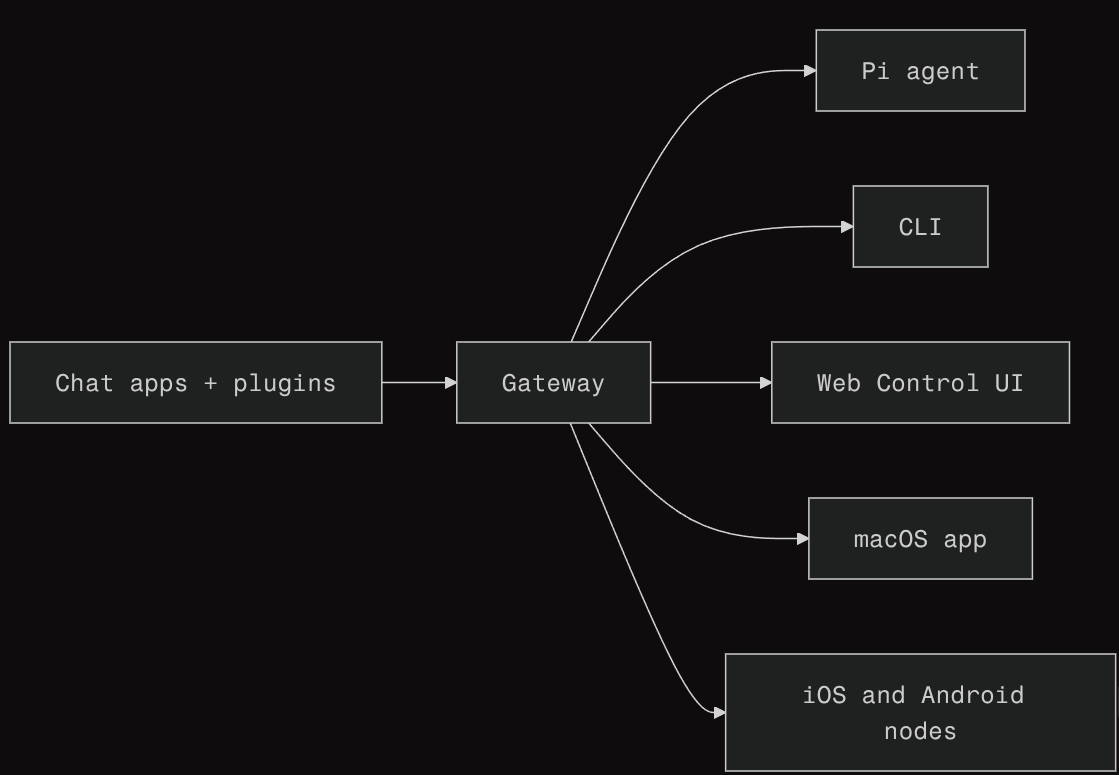 System Architecture of OpenClaw
It's like having a very capable assistant that lives in your messages.
Why You'd Want This
Automation: Stop doing repetitive stuff manually. Need to check your disk usage? Just message your agent and get the answer in WhatsApp.
Always available: Your agent doesn't sleep. Schedule tasks, get notifications, have conversations at 3 AM without waking anyone up.
Multi-platform: Use the same agent across WhatsApp, Telegram, Discord, iMessage—whatever you prefer. One agent, many surfaces.
Why This Terrifies Me (And Should Terrify You Too)
An agent with access to your machine filesystem and has complete access is powerful. But power without safeguards is just a security hole waiting to be exploited.
Attack Surface (The Scary Version)
Loading diagram...
Imagine this scenario:
- You install OpenClaw globally on your machine
- You connect it to your WhatsApp account
- Someone social engineers you and gets your phone number
- They send your agent a message that somehow exploits a vulnerability
- Your agent is now running arbitrary commands as your user
It reads your SSH keys, exports your credentials, deletes your files, or sells your data. (The cons of complete access)
Or worse: a vulnerable plugin or dependency gets installed and it does that without anyone sending a message.
Is this likely? No. Is it possible? Yes.
The Safe Way to Run OpenClaw
This is where this guide comes in. We're going to set up OpenClaw the way you should set it up:
Isolated. Running in Docker so it can't touch your host machine.
Locked down. With the bare minimum permissions it actually needs.
Think of it like this: you wouldn't give a stranger the keys to your house and say "just promise not to steal anything." You'd give them access to the front door, a doorbell to call if they need something, and you'd lock the bedroom.
OpenClaw runs in a similar setup. It has access to what it needs (workspace, config, maybe some integrations) and absolutely nothing else.
Secure Architecture (The Safe Version)
Loading diagram...
The difference:
- ❌ Without isolation: Attacker → OpenClaw → your entire machine
- ✅ With Docker: Attacker → OpenClaw → confined container → nowhere
The use of Docker here, reduced the blast radius in case things go wrong.
A Word About Safety
Nothing is 100% secure. But there's a difference between:
- Reckless: Running OpenClaw with
sudo, giving it access to/, no monitoring - Reasonable: Running it in Docker, with limited permissions, logging enabled, auditing what it does
What Next?
I had thought of documenting the method to run it locally here. But the official docs of Openclaw has been updated now and its pretty detailed, so feel free to go ahead and follow the steps mentioned in https://docs.openclaw.ai/install/docker#docker . Happy Hacking !!